|
405 Documentation
9.0
|


|
|
405 Documentation
9.0
|
|
Intro to ADCs
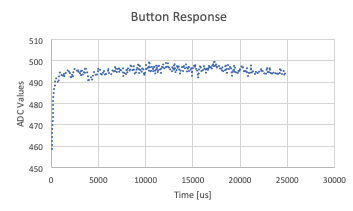
This lab consists of two parts, lab03_main.py which is run on the Nucleo, and lab03_ui.py which acts as the user interface on the host computer. After a handshake establishes communication between the computer and Nucleo, the green LED on the board lights up. This indicates the user can press the blue botton. An onboard ADC reads the voltage data of resulting from the button press. Pressing the user button on the Nucleo (default HI) cuases the voltage to drop before returning to its HI state. This script sends data collected f rom the button press as a CSV to a host computer over a UART Serial conncetion. The host UI then uses Matplotlib to process and plot the data. The following image was generated from the CSV file in Excel because it was more presentable.
(Source: https://bitbucket.org/dhmorse/me-405/src/master/Lab03/)
 1.9.0
1.9.0